
Comments on Call Transcripts
Select any passage of a call transcript and start a comment thread anchored right there. Mention teammates — and if they can't see the recording, Day AI prompts you to grant access before the comment posts, so nobody gets pinged into a wall. Reply, edit, resolve and reopen, and browse Open and Resolved threads in the comments rail. Clicking a comment notification drops you on the transcript with the rail open, the thread focused, and the passage scrolled into view — no hunting.
Your agent is in the thread too. Agents can read, create, reply to, resolve, and reopen transcript comments — and do the same on Pages (read, create, and update; deleting stays human-only). Agent comments are now attributed to the agent itself, with its own name and avatar, so you always know whether a human or an agent said it.
Momentum
Momentum is a new sidebar tab on organizations, opportunities, and contacts that charts your customer interactions — meetings, calendar events, and emails — over time, so you can see the rhythm of a relationship instead of reconstructing it from a timeline. It defaults to the last 30 days, with 90-day and all-time views one click away.
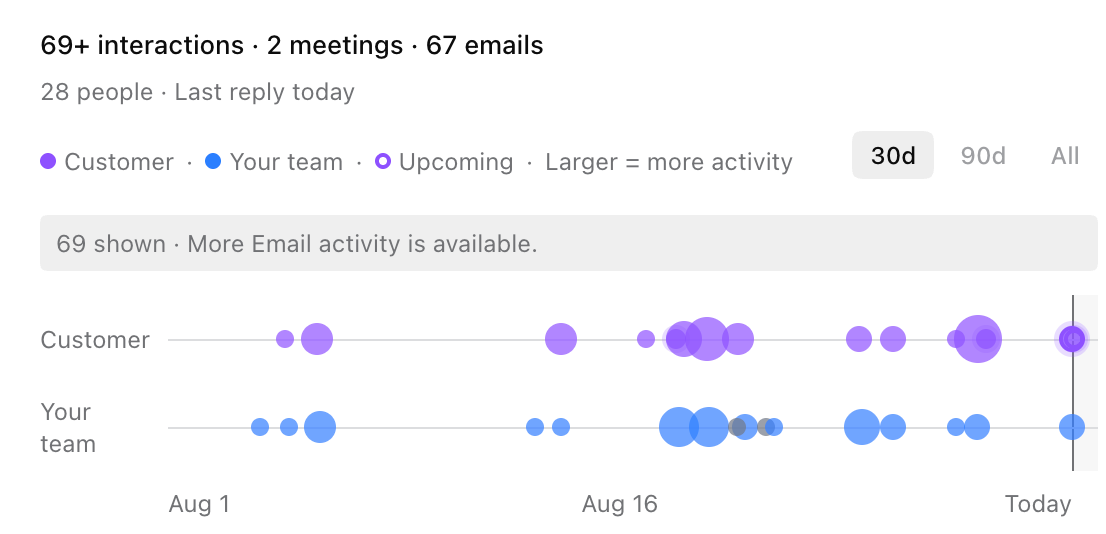
There's also an opt-in Momentum column for opportunity tables: a compact activity strip on every deal, so you can scan a whole pipeline and instantly see which deals are humming and which have gone quiet. Hover for interaction previews, and click through to open the underlying email or meeting.
Also shipped
Emails in search: Cmd+K search now shows emails in their own Emails section instead of disguising them as pages. Opening a pending campaign email takes you straight to that campaign's review queue with the draft focused and approve/send controls ready; other emails open the full email editor.
Opportunities link to organizations without domains: An opportunity can now auto-link to an organization by exact name match, so companies without a website domain still connect to their deals.
Peerfold MCP connector: Connect Peerfold from Settings → Connectors and let your agent work with your customer-education data — courses, lessons, learners, enrollments, quizzes, certificates, and reporting. Authentication is per-user OAuth, same as the other MCP connectors.
Date format setting: Choose MM/DD/YYYY or DD/MM/YYYY in your Profile settings, right below Timezone. The preference applies across tables, views, and property cells.
Private Page mentions ask about access: Mentioning someone on an invite-only Page now prompts you to decide their access before the mention lands — in the page body immediately, and in comments at send time. No more notifying someone into a page they can't open.
Folders first in Pages: The Pages library root now lists your folders above unfiled pages, so navigating a organized library doesn't mean scrolling past loose documents.
Sharing settings per account: If a teammate has multiple Google accounts connected, the Members page now shows sharing settings for each account separately instead of blending them into one status.
Contacts created in chat now get enriched: Contacts created through chat were silently skipped by enrichment. They now enrich on creation like contacts from every other source.
.jpeg)